Changelog

Follow new updates and improvements to Hyper.

February 17th, 2025

1. Added the ability for admins to export TG User’s X Accounts Data:

By selecting the new ‘Users Twitter Accounts’ option, admins can now see a list of Telegram users (that have interacted at least once with raids in the group) and their associated linked twitter accounts. Available in the /export section.
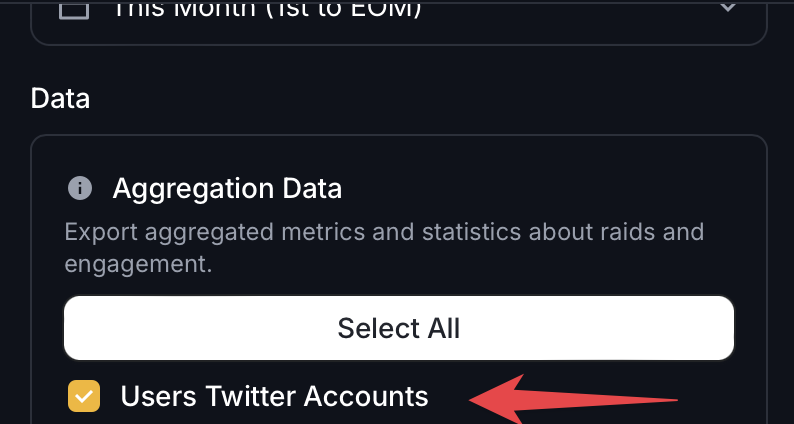

2. You can now easily Select All options when Creating Exports.

By clicking the Select All button, you can now easily select all the data u want to export.


3. Fixed DeepReply

Users who weren’t admin couldn’t DeepReply. This has now been resolved.


4. Adjusted Errors & Logging

Users who can’t QuickReply due to an unresolved X API bug out of our control will now see an alert telling them to DeepReply instead.

If raids end prematurely due to an error retrieving the tweet of some kind, the group will be alerted about it, along with the URL used for the raided tweet. It will auto-delete in 25s once posted.

February 16th, 2025

New

Fixed

1. Added the ability for admins/users to DeepReply:

View the docs here to understand how it works:

https://hyper.furiesmellow0x69.com/deepreply/overview


2. Fixed Leaderboard Bug:

There was an issue preventing users from refreshing the leaderboard correctly. This has been resolved.


3. Fixed SmartReply Targets Change

There was an issue preventing users from setting the default smartreply targets. This has been resolved.


4. Added Message Updates when Default Targets Change

  • Groups will now receive a message when default targets change for Standard Raids, AutoRaid & SmartReply.

February 15th, 2025

New

Fixed

1. Added the ability for admins to explicitly authorize & deauthorize any user/admin:

  • /authorize [TELEGRAM-ID] – Grants a user full admin privileges for HyperRaidBot, allowing them to start raids, etc. (without making them a Telegram chat admin)

  • /deauthorize [TELEGRAM-ID] – Revokes HyperRaidBot admin privileges from any user, including actual Telegram admins, restricting them from bot-specific admin functions like starting raids.

  • /authorizations – Lists all explicitly authorized users.

  • /deauthorizations – Lists all explicitly unauthorized users.

  • Default Behavior – Telegram chat admins automatically have HyperRaidBot admin privileges unless explicitly deauthorized.


2. Increased Media Storage Quota:

  • Personal Media Storage: 20 → 100

  • Chat Media Storage: 50 → 100


3. Modified SmartReply Generation Outputs

  • SmartReply Generation has slightly changed to allow for accommodating more of the chat’s provided SmartReply Context data.

  • SmartReply Character Count now varies per reply (unless SmartReply Context explicitly says to keep replies short).

  • Modified the default tone of replies if none (or very little) provided by the SmartReply Context.


4. Fixed Image Deletion for Mobile

  • There was a bug preventing users from holding down on an image to be able to delete it from their Media Storage. This has now been resolved.


5. Removed View Counter from Raids

  • Due to inconsistencies with the view counts shown via an X Client, the view counter will no longer show in the raid messages.


6. Fixed AutoRaid Target-Change Issue

  • While AutoRaid was enabled, it was not pulling the most recent updates to the targets during polling. This has been resolved


7. Added ‘🤖 AutoRaid’ indicator to AutoRaids

  • On raid messages where there is an active AutoRaid, it will now show ‘🤖 AutoRaid’ at the top.


Example Scenario: How Explicit Authorizations Work in HyperRaidBot

Initial Chat Setup

A Telegram group has the following users and roles:

Telegram ID

Username

Telegram Chat Role

HyperRaidBot Privileges

1001

Alice

Admin

✅ Full Privileges (Default)

1002

Bob

Admin

✅ Full Privileges (Default)

1003

Charlie

Member

❌ No Admin Privileges

1004

Dave

Member

❌ No Admin Privileges


Scenario 1: Authorizing a Standard User

Command Issued:

/authorize 1003

Updated Table:

Telegram ID

Username

Telegram Chat Role

HyperRaidBot Privileges

1001

Alice

Admin

✅ Full Privileges

1002

Bob

Admin

✅ Full Privileges

1003

Charlie

Member

✅ Full Privileges (Explicitly Authorized)

1004

Dave

Member

❌ No Admin Privileges

Explanation: Charlie, who was just a standard member, now has full admin privileges for HyperRaidBot. However, he is still just a regular member in the Telegram chat.


Scenario 2: Deauthorizing an Admin

Command Issued:

/deauthorize 1002

Updated Table:

Telegram ID

Username

Telegram Chat Role

HyperRaidBot Privileges

1001

Alice

Admin

✅ Full Privileges

1002

Bob

Admin

❌ No Admin Privileges (Explicitly Deauthorized)

1003

Charlie

Member

✅ Full Privileges (Explicitly Authorized)

1004

Dave

Member

❌ No Admin Privileges

Explanation: Even though Bob is an Admin in the Telegram chat, he has been explicitly deauthorized. This means he cannot use any admin features in HyperRaidBot.


Scenario 3: Removing Charlie’s Authorization

Command Issued:

/deauthorize 1003

Updated Table:

Telegram ID

Username

Telegram Chat Role

HyperRaidBot Privileges

1001

Alice

Admin

✅ Full Privileges

1002

Bob

Admin

❌ No Admin Privileges (Explicitly Deauthorized)

1003

Charlie

Member

❌ No Admin Privileges

1004

Dave

Member

❌ No Admin Privileges

Explanation: Charlie, who was previously authorized to use HyperRaidBot as an admin, has now lost those privileges. He remains a standard user in both the Telegram chat and HyperRaidBot.


Summary of Authorization Rules

  1. Telegram Chat Admins Automatically Have HyperRaidBot Admin Privileges unless explicitly deauthorized.

  2. Standard Users Can Be Explicitly Authorized to gain HyperRaidBot admin privileges.

  3. Explicitly Deauthorized Users Lose Admin Privileges even if they are Telegram Chat Admins.

  4. You Can View Authorized and Deauthorized Users using /authorizations and /deauthorizations.

February 15th, 2025

Via the Mini App by clicking the Menu Icon at the top right, and then the dropdown, users can now easily access the Roadmap & Feedback section.